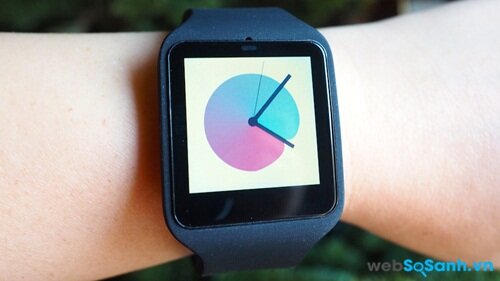
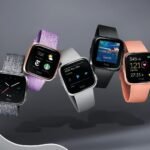
Continuing with Part 1 of the review of the Sony SmartWatch 3, in this part 2 we delve into the user manual, performance, and battery life of this smartwatch.
One of the signs showing Sony’s change is the change of Sony SmartWatch 3’s operating system to Android Wear operating system, not its proprietary operating system like the other two. smart watch predecessor generation. This means that if you’ve read any previous Android Wear reviews or done your own, you already know how to use the Sony SmartWatch 3.
First of all, you need one phone Android to start downloading Android Wear apps. From here, you simply connect your watch to your phone by following the onscreen instructions.
How to navigate your watch: From the default watch face, swipe down to reveal the date, battery information, and quick access to off, Theater Mode (where the screen turns off), and settings. Whenever you receive a notification, you can swipe up to see it, then swipe right to hide it or swipe left to find it again later. If you want to change different screen styles of the watch, just click on the default wallpaper of the watch. It’s all quite intuitive and you can easily use it because it’s quite similar smartphone.
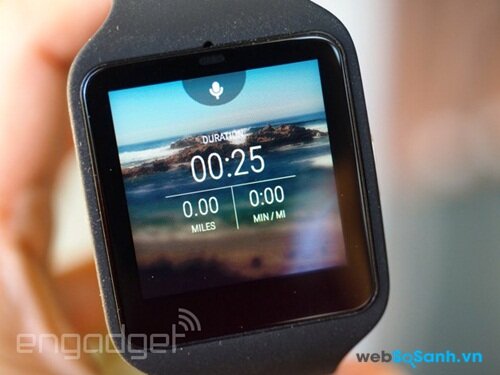
If you don’t want to use your hands to swipe on the screen, you can use the voice command function because SmartWatch 3 has a built-in microphone. You can command the watch to create a reminder, send a message or find a certain utility, the watch will help you do all the commands you ask. The voice command function of Sony SmartWatch 3 is rated quite well.
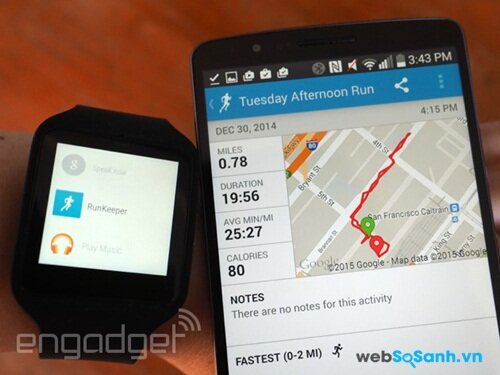
As I said above, the SmartWatch 3 is also the first Android Wear device with built-in GPS. This is a very important feature for runners or athletes who always have to monitor GPS positioning on the watch to see distance, route, and cadence. With previous Android Wear devices, you would have to have your phone attached to your body to receive geolocation data. This causes you a lot of trouble while running. If you use SmartWatch 3, you can run without having to carry your phone with you.
Of course, the SmartWatch 3 only runs athletics apps that have built-in Android Wear GPS functionality. Currently there are not many support applications for runners, but that’s why the RunKeeper application has become more popular. I downloaded the RunKeeper app to my phone and it automatically synchronizes the app on the watch. I often leave the office to go for a walk. I left the phone in the desk drawer. Before leaving, I started the RunKeeper application. Once you return to the office and reconnect the watch to your phone, the app will automatically transmit route information, cadence and distance information to the RunKeeper website. In short, the SmartWatch 3’s GPS function is as advertised, essential for those who want to track their steps or for true athletes.
SmartWatch 3 has a step counter, but does not have a heart rate monitor Moto 360 or ASUS ZenWatch.
Performance and battery life
With a 4-core ARM Cortex-A7 1.2GHz processor and 512MB RAM, the performance of Sony SmartWatch 3 is rated quite good. Experimenting with this watch shows that the device rarely freezes and the voice recognition function is very fast. As mentioned before, the accelerometer in the watch seems a bit slow when trying to increase the brightness, but overall the performance of Sony’s smartwatch, the SmartWatch 3, is good.
When talking about the battery life of the Sony SmartWatch 3, you can always rest assured that the battery will last under sunlight. SmartWatch 3 uses a 420mAh battery, the largest battery we see in Android Wear watches. Battery life is rated for up to 2 days of use. In fact, I find this assessment to be quite accurate. I use Twitter, Facebook, and calendar notifications, use GPS to track regular walking routes, listen to a few songs on repeat in Play Music, and use voice commands throughout the day. With a lot of the above, the watch battery lasts about a day and a half before being notified that it needs to be charged. If you leave it in airplane mode and keep the screen off, the battery life is up to 48 hours. I am quite impressed with the Sony SmartWatch 3’s battery.
Conclude
If you want a smart watch that ensures quality and supports you a lot in exercise such as walking, running or tracking the training process of athletes, then the Sony SmartWatch 3 smart watch is the number one choice.
See more: The best smart watches today
Minh Huong
(According to engadget)
“Websosanh.vn – The first comparison website in Vietnam”

 https://orcid.org/0009-0009-1599-2739