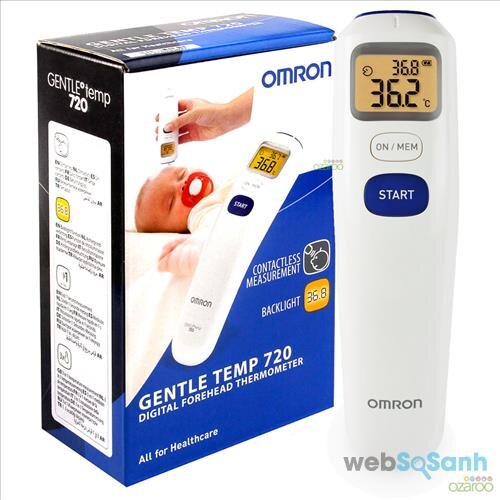
If you have just purchased an Omron electronic forehead thermometer and do not know how to use this thermometer to get accurate measurements, the information below may be useful to you.
Even though it’s a line thermometer Modern, good quality and quite expensive, however, if you do not know how to use it correctly, the measurements from the Omron electronic forehead thermometer will not be accurate. Therefore, to ensure safety and help mothers use the Omron electronic thermometer to accurately measure their children’s forehead, below. Websosanh Detailed instructions on how to use the Omron electronic forehead thermometer.
Instructions for using Omron electronic forehead thermometer for babies
Before going, you need to clean your head and make sure your forehead is free of sweat, cosmetics and avoid scarring. In addition, when measuring, you should measure 3 times and take the average to ensure the most accuracy.
Measure your child’s body temperature using: Omron electronic thermometer Measure your forehead as follows:
– Open the probe cover.
– Press the ON/MEM button, all icons will appear on the screen for 1 second followed by 2 beeps.
– Place the measuring head 1 to 3 cm from the middle of the forehead.
– Holding the thermometer in your hand for too long can cause the temperature around the probe to be higher, which can cause the body temperature to be lower than normal.
– Keep the thermometer intact during measurement.
– Press the START button, the measurement process will be completed in 1 second and with 1 long beep.
– Remove the thermometer from the forehead and check the temperature result. The screen will light up within 5 seconds.
– If the measurement result is higher than 42.2°C (108.0°F), the word “Hi” will appear on the screen.
– If the measurement result is lower than 34.0°C (93.2°F), the word “Lo” will appear on the screen.
– You can continue measuring after the screen light turns off with 2 beeps.
– After the second measurement, the results of the previous measurement will be displayed in the upper right corner, the results of the second measurement will be displayed in the center of the screen.
– Press and hold the ON/MEM button until the word “OFF” appears on the screen to turn off the thermometer.
– The thermometer will automatically save the measurement results and turn off the device with the room temperature displayed on the screen.
– The thermometer will automatically power off after 1 minute if inactive.
How to use Omron electronic thermometer to measure object surfaces
Surface measurement mode indicates the actual and uncorrected surface temperature of an object, as opposed to body temperature. This measurement mode can help you determine whether the temperature of the object is suitable for your patient or baby (such as milk for children).
Normally, the thermometer is set to forehead measurement mode by default. To switch to surface measurement mode, follow these steps:
+ Press the ON/MEM button to turn on the device.
+ Press and hold the ON/MEM button at the same time press and hold the START key. The icon will appear on the screen.
+ Place the probe close to the object whose temperature needs to be measured and press the START button. The machine will measure continuously until you stop pressing the START button.
Note:
– Keep the measuring head as close as possible to the object to be measured (about 1cm). Do not let the probe directly touch the object to be measured.
– Surface measurement mode gives surface temperature results. The surface temperature and internal temperature of the object may be different.
– The display will not light up and the sound will be muted when using this mode.
– The machine will turn off automatically when inactive for 1 minute, the room temperature will be displayed on the screen. To turn off the device, press and hold the ON/MEM button until the word “OFF” appears on the screen.
– Surface measurement mode is not used to measure body temperature or for medical purposes.
How to use the result saving function of Omron electronic thermometer
Electronic forehead thermometer Omron can save the results of 25 measurements (except for results that are too high/low)
– If the memory is full, the device will automatically delete the oldest results.
– When the thermometer converts from °C to °F, all measurement results stored in memory will be erased.
– Press the ON/MEM button to turn on the device
– Press the ON/MEM button again, the memory number will appear on the screen
– Stop pressing the ON/MEM button, the latest measurement results will be displayed on the screen. Press the ON/MEM button to continue viewing other measurement results.
– Press and hold the ON/MEM button until the word “OFF” appears on the screen to turn off the device. The thermometer will turn off with the room temperature displayed on the screen.
Hopefully you already know the information above How to use an electronic thermometer Omron forehead meter to measure children’s body temperature.

 https://orcid.org/0009-0009-1599-2739